All plugins Liminal Hz Liminal Amp RedRoom Legion music Download Buy me a coffee

One amp, one cab,
nothing in the way

Liminal Amp is a free Neural Amp Modeler for Akai MPC and Force. It plays A2 captures through a noise gate, a tone stack and a cabinet IR the way the official NAM plugin does, at the lowest CPU cost we could measure, on the hardware itself.

Measured on an Akai Force: the whole plugin uses about 16% of an audio block

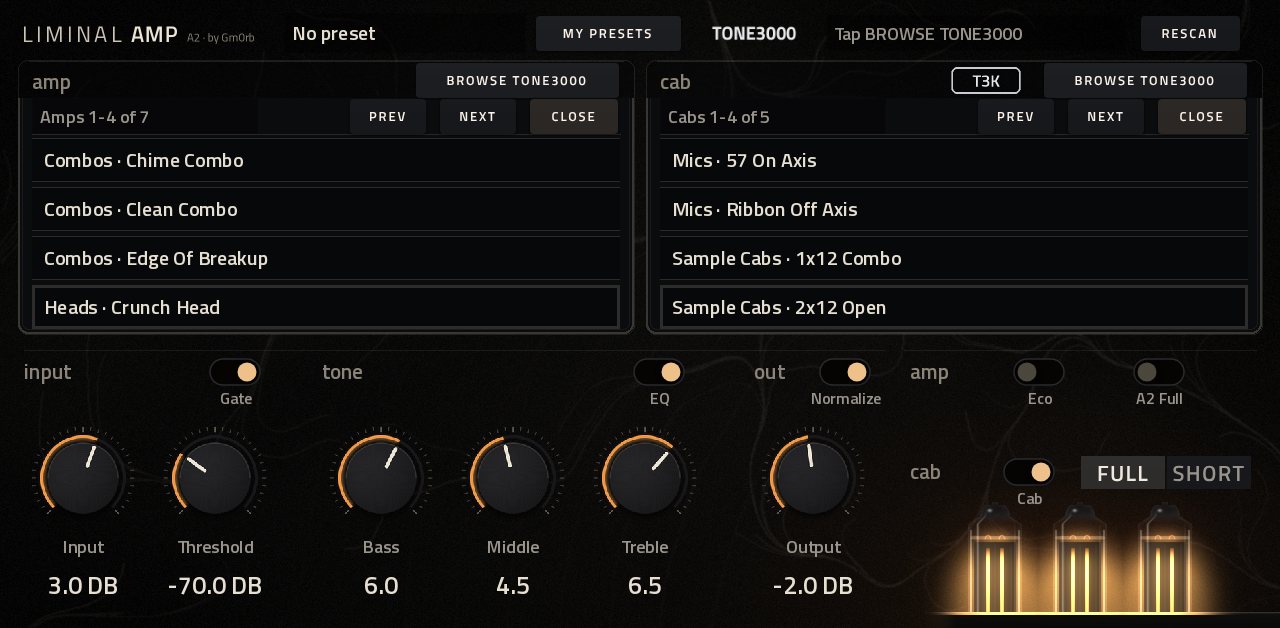
The Liminal Amp page on the MPC: the amp block on the left with its pluck print, the cab block on the right, the input, tone and out knobs below and three glowing valves in the corner.
The whole plugin is one page on the MPC's touchscreen. Shown here with a card of sample files, so the amp and cab names are made up.

The sound of the official NAM plugin, on the MPC itself. Small on purpose, so there's room left for the rest of the song.

One job, done faithfully

Liminal Amp runs a capture and a cab, and nothing else in the signal path. Everything it does is aimed at sounding like the official plugin while leaving the MPC room to breathe.

Sounds like the official plugin

Captures are trained at 48 kHz and the MPC runs at 44.1 kHz, so Liminal Amp resamples around the model just as the official plugin does. The capture's EQ and dynamics sit where the capture put them. The noise gate and tone stack are the official plugin's own code.

Light on the CPU

NAM's A2 fast path for the amp and FFT convolution for the cab. An 8192 sample cab IR adds about 3% of an audio block on a Force, where the direct way would cost many times that.

Browsing never cuts the sound

Captures and IRs are found and loaded in the background, then handed over without a gap. The audio never waits on a card or a file.

Your files, wherever they are

Put .nam captures in a folder named models and .wav IRs in a folder named irs, on any drive or card, in packs if you like. The plugin remembers where it found them, so a project's amp and cab load as soon as it opens.

  • models
  • irs
  • presets

What happens to your sound

The official plugin's chain, in its order. The amp runs an A2 capture at its Lite size, which is how it stays light.

  1. InputLeft and right averaged, ±20 dB
  2. GateNoise gate, with its threshold
  3. AmpThe A2 capture, resampled to 48 kHz
  4. ToneThe official bass, middle and treble
  5. CabYour IR, up to 8192 samples
  6. OutLevel, and Normalize

What it costs on an Akai Force

16.1% of an audio block, p99 19.0%

  • Amp, with resampling 11.9%
  • Gate and tone stack 1.2%
  • Cab IR, 8192 samples 3.0%

Mean share of one audio block on one core: 44.1 kHz, 128 frame blocks, about 2.9 ms. Good for one or two instances alongside a project.

Everything on one page

Made for the touchscreen, with nothing hidden on other tabs. The amp is on the left, the cab on the right, and the knobs below, each group with its switch above it.

Input
Input, ±20 dB into the amp, and the noise Gate with its Threshold, from −100 to 0 dB.
Tone
Bass, Middle and Treble from 0 to 10: the official plugin's tone stack, with the EQ switch to bypass it.
Out
Output, ±40 dB, and Normalize, which sets the level from each capture's own measured loudness so changing amps keeps the volume about the same.
Cab
The Cab switch, and the IR length: Full, up to 8192 samples, or Short, 4096 and a little cheaper.
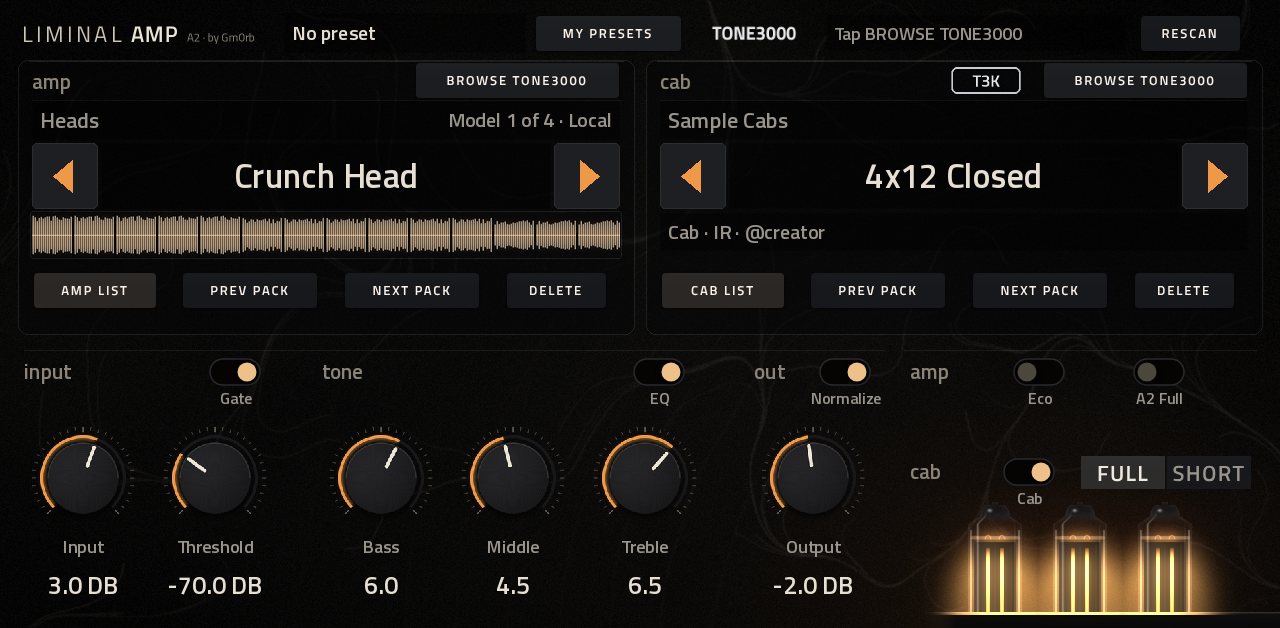
Amp
Eco and A2 Full, both off by default. More on those below.
AMP LIST and CAB LIST open over their blocks, four captures and four IRs to a page, the one in use outlined.
Amp list and Cab list, for long libraries: four to a page as pack and name. Tap one to load it and the list stays open, so you can try one after another.
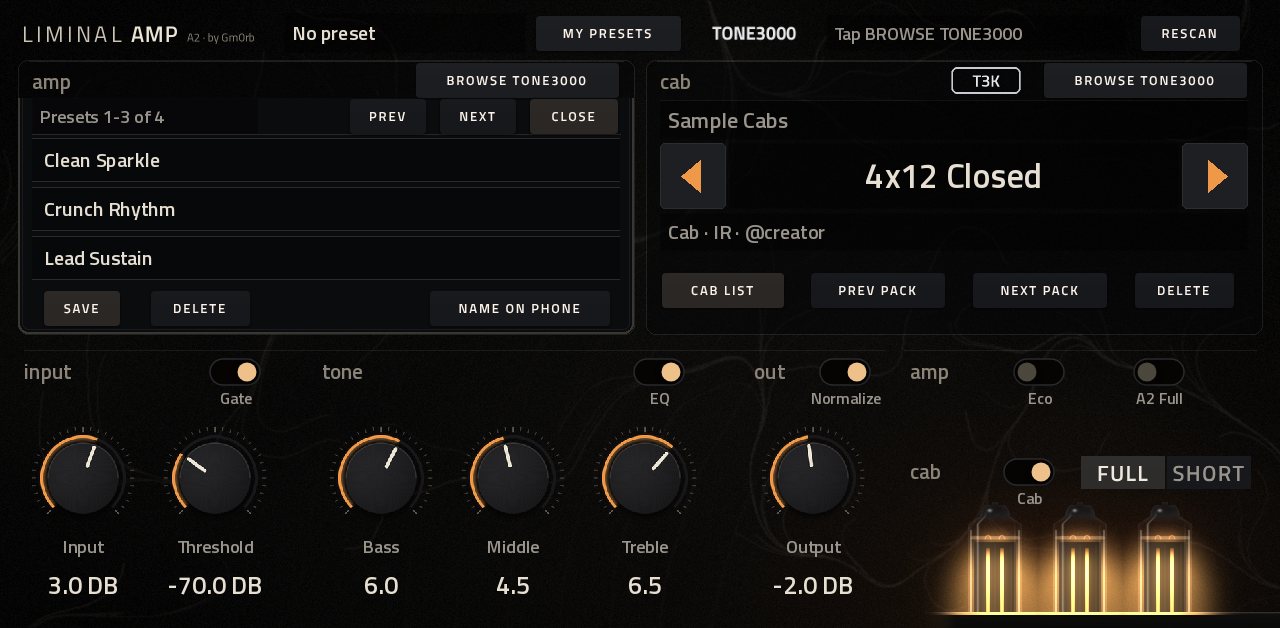
My Presets open over the amp block: three saved rigs, with Save, Delete and Name on phone.
My Presets keeps the whole rig: every setting, the amp and the cab. A project remembers the one in use.

See the amp

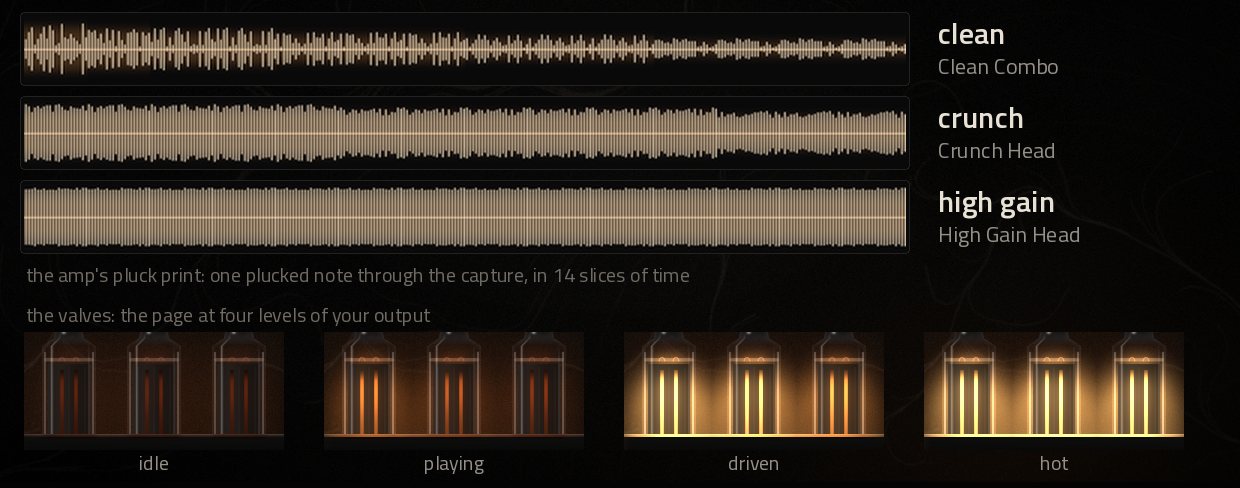
The page has a pulse: a picture of what the loaded capture does to a note, and valves that glow with your level.

Three pluck prints, clean, crunch and high gain, above four pictures of the valves from idle to hot.

The pluck print

When a capture loads, one plucked string is played through it in the background and drawn under the amp's name. A clean amp shows a sharp attack that fades, crunch holds the note and evens its peaks, and high gain is a solid wall. It's a picture of the capture, not a meter, so it stays still while you play.

The valves

Three power valves in the corner show your output level. The heaters glow dull red in silence, heat up one after another as you play, and cool over about two and a half seconds once you stop.

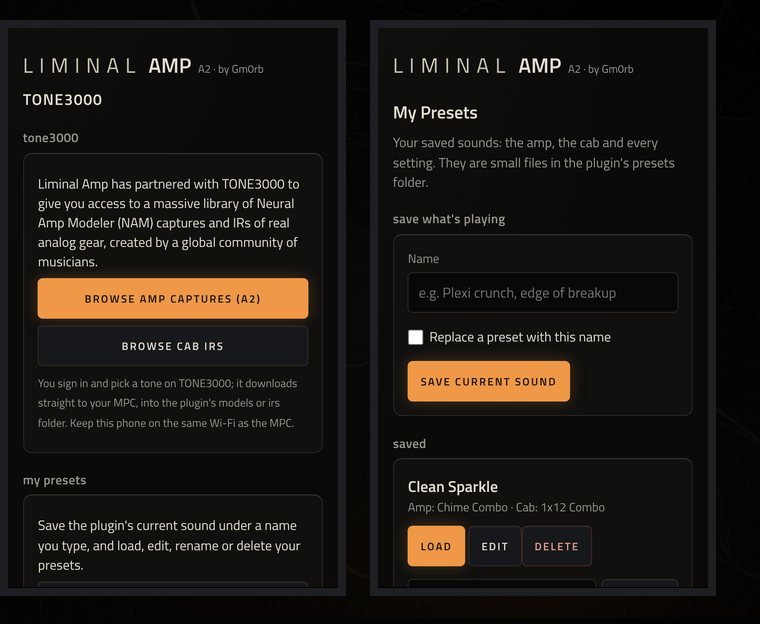
Two phone pages in the plugin's look: browsing TONE3000 for amp captures and cab IRs, and saving My Presets by name.

TONE3000 and My Presets, from your phone

The plugin serves small pages to a phone on the same Wi-Fi as the MPC, in its own look. No app to install and no password.

  • Tap Browse TONE3000 on the amp or the cab and open the address it shows. You pick on TONE3000 itself, A2 captures for the amp and cab IRs for the cab, and the tone downloads straight to the MPC with its creator and licence kept beside it.
  • The MPC has no keyboard, so presets are named on the same page. You can also load, rename, delete and edit every setting of a preset there, and that part needs no internet.
  • Nothing about your TONE3000 account is stored on the device. The pages close themselves after 15 idle minutes.

Eco and A2 Full

Two switches for when the default isn't right for the project. Both are off until you turn them on, and a project or preset keeps them as saved.

Eco

Runs the capture at the MPC's 44.1 kHz without resampling. It costs less, but the capture's tone shifts slightly, about 8% lower in frequency, which is why the official sound stays the default. On MPC's own meter a Force project went from 30 to 34% with a capture and an IR, to 27 to 29% with Eco on.

A2 Full

Plays an A2 capture at its Full size, 8 channels instead of 3. On a Gen 1 Force that alone takes about 57% of an audio block, so it's for simple projects or faster hardware. It asks twice: the first tap shows a warning, and a second tap within six seconds turns it on.

Measured on an Akai Force

Share of one audio block on one core, at 44.1 kHz with 128 frame blocks. Shorter IRs cost less.

What runsMeanp99
The A2 capture at its Lite size, with resampling11.9%13.8%
Plus the noise gate and tone stack13.1%15.0%
Plus an 8192 sample cab IR: the whole plugin16.1%19.0%
The capture at its Full size, with A2 Full on57%not used unless you turn it on

Install

Liminal Amp installs the way MPC plugins did before MPC OS 3.10.1, so it needs SSH access to the device (modded firmware). Use one install method per device. Your models, irs and presets folders are kept across upgrades.

Gen 1

Force, MPC Live and Live II, MPC One, MPC X, MPC Key 61

  1. You need the Synths folder with vstscanner.sh from the Force VST plugins distribution.
  2. Unzip the download and copy the Gm0rb - VST - Liminal Amp folder into Synths. On a Force with MockbaMod that's /media/662522/Synths.
  3. Put .nam captures in a models folder and .wav IRs in an irs folder, inside the plugin folder or anywhere on your cards.
  4. Run sh /media/662522/Synths/vstscanner.sh on the device. MPC restarts, and Liminal Amp is under VST, manufacturer Gm0rb.

v1.0.2, 5 MB

Gen 2

MPC Live III and other RK3588 units, 64 bit

  1. Install Liminal-Amp-<version>-mpc-aarch64.zip from the MPC OS Plugin Catalog. Its installer picks this build on a Gen 2 device.
  2. Or copy the zip to the device, unzip it and run its install.sh as root, following its INSTALL.md. A removable card's Synths folder is the safest target.

v1.0.2, 6 MB

Gen 2 is new. The 64 bit build is the same plugin, and projects and presets move between generations, but so far it has been tested under emulation only, not on a Gen 2 device. If you run it on one, tell us how it went. Akai doesn't test or support third party plugins, so save your work often.

Questions

Is it really free?

Yes. Liminal Amp is MIT licensed and free to use on anything you release. Captures and IRs you download from TONE3000 belong to their creators and carry their own licences, which the plugin keeps beside each download. If it ends up on your records, you can buy Gmorb a coffee.

What's an A2 capture, and where do I get them?

A2 is a Neural Amp Modeler model architecture. Liminal Amp is made for A2 captures, which it runs at their Lite size by default. Tap Browse TONE3000 on the amp to pick them on your phone, or put .nam files you already have in a models folder.

Which MPCs and Forces does it run on?

Gen 1: Force, MPC Live and Live II, MPC One, MPC X and MPC Key 61. Gen 2: MPC Live III and other RK3588 units, with a build tested under emulation so far. It runs on the hardware in standalone mode; it isn't a desktop plugin.

Do I need modded firmware?

For now, yes. Installing needs SSH access to the device, on Gen 1 with the Synths folder and vstscanner.sh, and on Gen 2 root access to run the installer.

Does it sound like the official NAM plugin?

That's the point of it. It resamples around the capture as the official plugin does, its gate and tone stack are the official plugin's code, and its cab convolution was checked against the official one. Eco trades a little of that for CPU, which is why it's off by default.

Can I use my own cab IRs?

Any .wav in a folder named irs, at any sample rate. A stereo IR is mixed down to mono, and up to 8192 samples are used, or 4096 with Short.

I want delay, reverb and more on the amp.

Put Liminal Hz after it for a room. For a fuller rig in one plugin, try NAM by jacob-sabella, also in the MPC OS Plugin Catalog. The two install side by side. Liminal Amp stays small on purpose.

Something isn't working. Where do I report it?

Open an issue on GitHub with your device, MPC OS version and what you did. Akai doesn't support third party plugins, so please don't contact them about it.

One amp, one cab, nothing in the way

Free, for MPC and Force. Put Liminal Hz after it and give the amp a room.